10Clones
The Clones tab is a plant gene calculator. Enter your clones’ genes and Codelock finds the best crossbreed and shows in 3D what to plant where, and in what order. It is open to everyone signed in; no subscription or Rust+ needed.
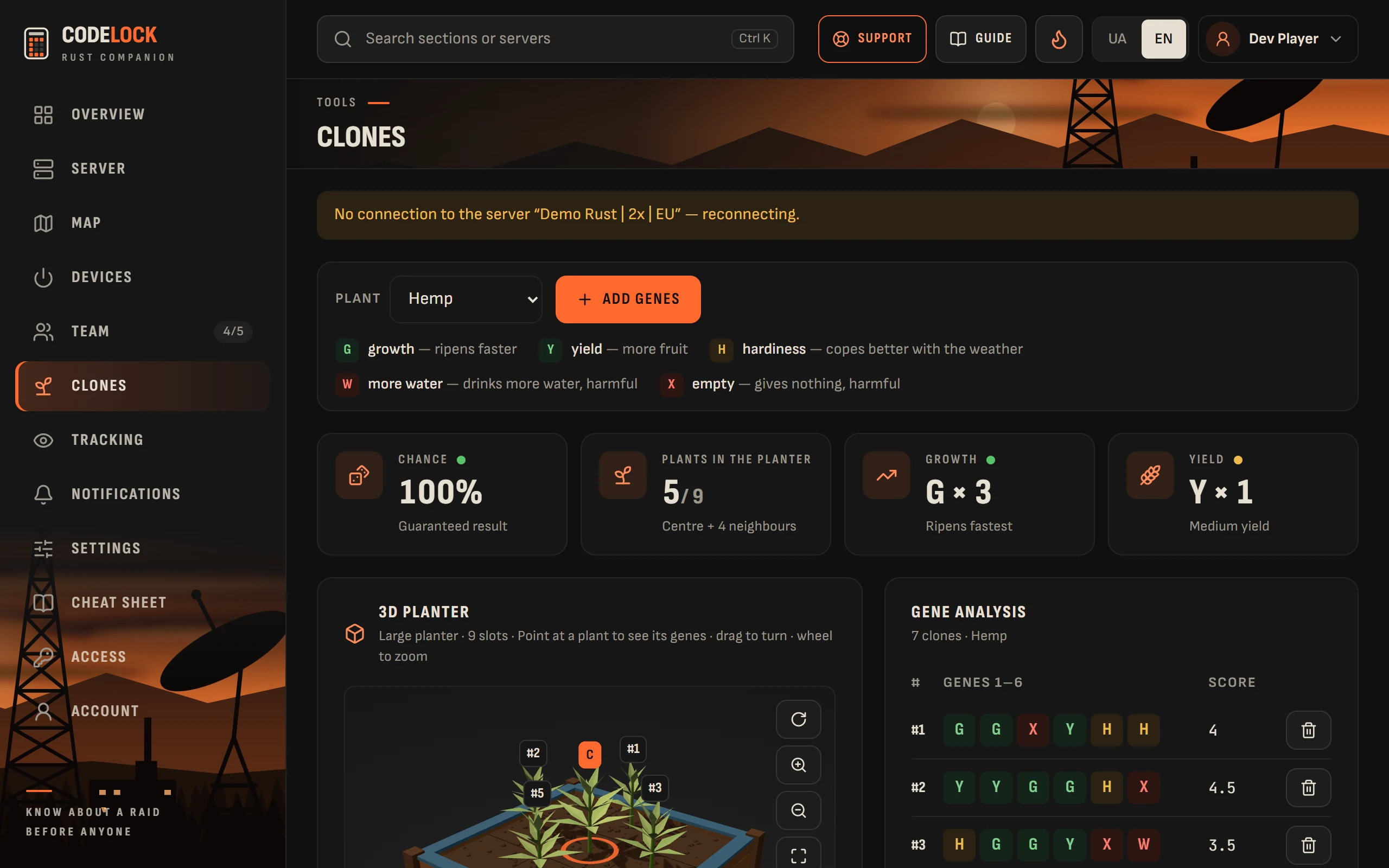
- Pick a plant and press "Add genes". Paste a list from your notes: any spelling works, such as GGYYHX, g-g-y-y-h-x or several clones on a line.
- "Gene analysis" shows your list with scores. Good genes are G (growth), Y (yield) and H (hardiness); W (more water) and X (empty) only get in the way.
- "Crosses" lists what these clones can give. Press one and it appears on the 3D planter and in "Layout". "Best clone" is the strongest result.
- "C" is the centre plant that receives the genes; "#2" is a clone from the list; "1st" is what to plant first. Point at a plant in the 3D planter to see its genes.
How to plant: plant the centre and wait 10–15 minutes, until the middle of the Sapling stage. Then plant the neighbours. If they are marked "1st", "2nd", plant those first: when genes tie, the one that got there earlier wins. When the centre has passed Crossbreeding, wait for the next stage and clone it.
How genes work: the centre takes genes from neighbours in the same planter, of the same plant, that touch it. A large 3×3 planter gives up to 8 neighbours. In each of the six slots the weights add up: a green gene weighs 0.6, a red one 1.0. The heaviest gene replaces the plant’s own only if it weighs more.
- "Crossing variants" has folded search settings: how many plants to put around the centre, how many times to cross in a row, whether one clone can be planted several times, which clone to look for (say, GGGYYY) and your own gene weights. The defaults suit most players.
- The list is shared with your team on the server: teammates on Codelock see the same clones and can add or remove them.
- A wipe clears the list on its own.
The list is not saved while no server is linked or your team is not known yet: the calculator works, but the clones are gone when you close the page.